package com.tjoeun.textfileIO;
import java.io.File;
import java.io.FileNotFoundException;
import java.util.Arrays;
import java.util.Scanner;
public class TextFileReadTest2 {
public static void main(String[] args) {
Scanner scanner = null; // 텍스트 파일의 데이터를 읽어들이는 스캐너
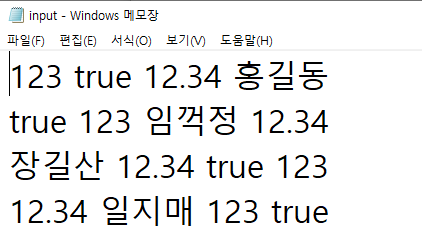
String filepath = "./src/com/tjoeun/textfileIO/input.txt";
try {
scanner = new Scanner(new File(filepath));
while (scanner.hasNextLine()) {
String str = scanner.nextLine().trim();
System.out.println(str);
System.out.println(Arrays.toString(str.split(" "))); // 방법1 : 공백을 경계로 배열처리
int i = 0;
boolean b = false;
double d = 0.0;
String s = "";
// String 변수에 저장된 문자열에서 읽어들이는 스캐너
// Scanner 클래스 객체를 만들 때 생성자의 인수로 String 변수를 넘기면 String 변수에
// 저장된 데이터를 읽어들이는 스캐너가 만들어진다.
Scanner scan = new Scanner(str); // 방법2 : 문자열에서 데이터를 읽어들이는 스캐너
// hasNext() 메소드는 스캐너로 지정한 문자열에 공백을 경계로 읽어들일 데이터가 있으면 true,
// 없으면 false를 리턴한다.
while (scan.hasNext()) { // 문자열에서 공백을 경계로 읽어들일 데이터가 있는 동안 반복한다.
if (scan.hasNextInt()) { // 스캐너로 읽을 데이터가 int 면 true, 아니면 false를 리턴한다.
i = scan.nextInt();
} else if (scan.hasNextBoolean()) { // 스캐너로 읽을 데이터가 boolean 면 true, 아니면 false를 리턴한다.
b = scan.nextBoolean();
} else if (scan.hasNextDouble()) { // 스캐너로 읽을 데이터가 double 면 true, 아니면 false를 리턴한다.
d = scan.nextDouble();
} else {
s = scan.next();
}
}
System.out.println("i: " + i);
System.out.println("b: " + b);
System.out.println("d: " + d);
System.out.println("s: " + s);
}
System.out.println("텍스트 파일에서 읽기 완료!!!");
} catch (FileNotFoundException e) {
System.out.println("파일의 경로가 잘못되었거나 파일이 존재하지 않습니다.");
}
}
}

'java&eclipse 코딩 알고리즘 > 20231214' 카테고리의 다른 글
| MemoList (0) | 2023.12.14 |
|---|---|
| MemoVO (0) | 2023.12.14 |
| StringTokenizerTest (0) | 2023.12.14 |
| TextFileReadTest (0) | 2023.12.14 |
| TextFileWriteTest (0) | 2023.12.14 |


